As you write, edit, delete, and install plugins, WordPress quietly stores leftovers: old revisions, drafts you never published, spam comments, expired temporary data, and metadata that no longer belongs to anything. None of that shows up in the day-to-day editing screens, but it still sits in the database and can make backups larger and the admin feel slower.
The Database section under Cleanup in Falcon is different from the other cleanup options. Instead of a permanent on/off switch, you choose what to clear and run the cleanup when you are ready. Falcon shows how many items of each type it found, so you can see the impact before you click.
Cleanup permanently deletes the selected data. Review the list carefully, and consider a backup first if you are unsure - especially before removing revisions or anything in Trash.
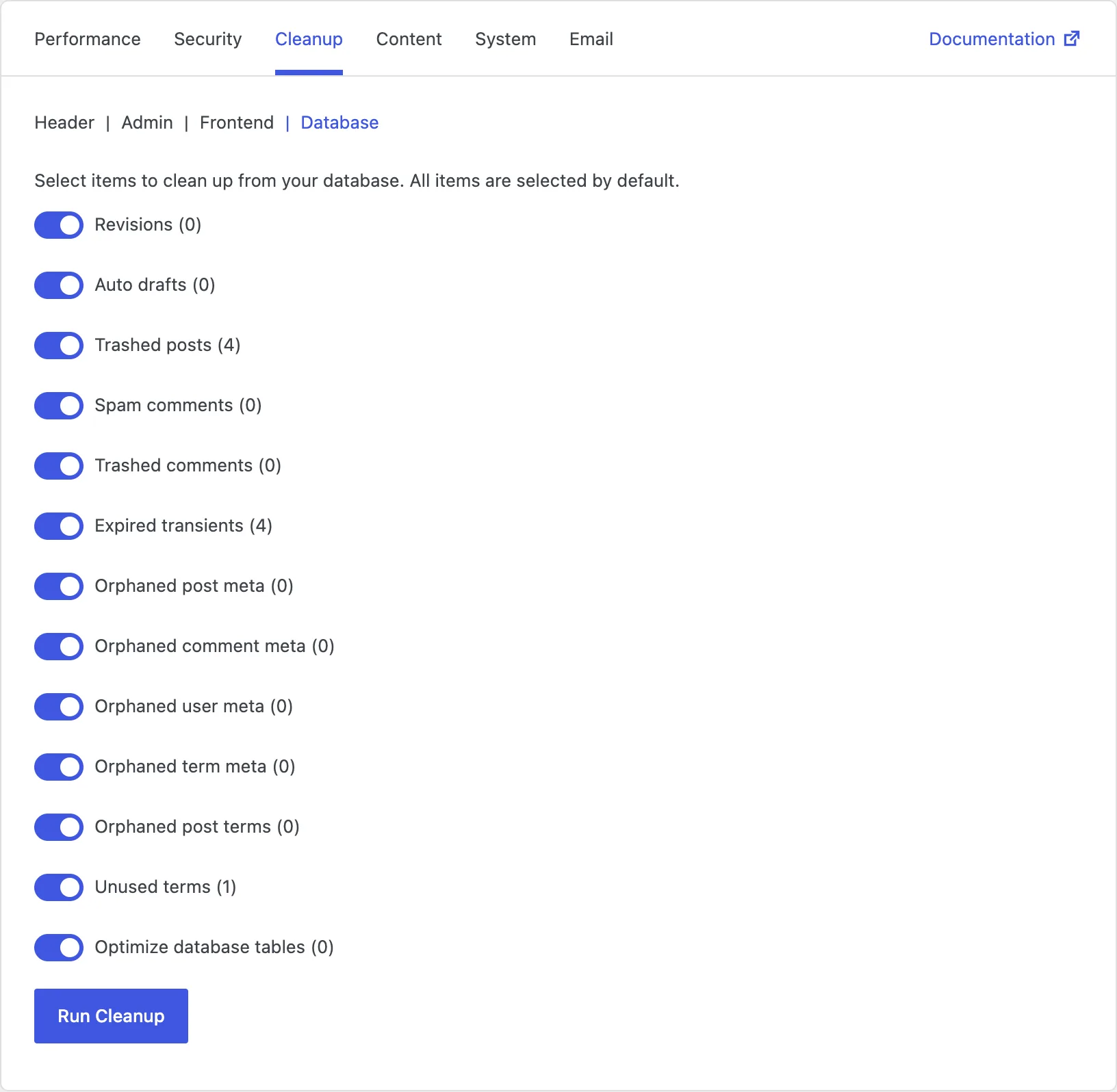
Revisions
Every time you save a post or page, WordPress can keep an older copy as a revision. That is helpful when you want to roll back a change - but on an active site, revisions add up fast and create thousands of extra rows.
Clearing revisions shrinks the posts table and removes history you no longer need. You will not be able to restore those older versions afterward, so keep this for content you are confident will not need a rollback. To stop WordPress from creating new revisions going forward, see Content → Editor.
Auto drafts
When you click "Add New" and then leave without publishing, WordPress may leave behind an auto draft. Over months of editing, those unfinished stubs pile up.
Removing auto drafts is usually safe housekeeping: they were never published, and clearing them keeps the database tidy without affecting live content.
Trashed posts
Posts and pages in Trash are already out of the public site, but they still occupy database space until they are emptied. If you are sure you do not need them back, clearing Trash frees that space.
After this cleanup, those items cannot be restored from Trash. Double-check before running it.
Spam comments
Spam comments marked as spam still sit in the database until you delete them. On sites that have been online for years, that folder can grow surprisingly large.
Clearing spam comments removes junk you have already rejected. Live comments and pending moderation are left alone.
Trashed comments
Comments moved to Trash work like trashed posts: hidden, but not gone. Emptying them is useful after you have reviewed and decided they should not come back.
As with other Trash cleanups, this deletion is permanent for those comments.
Expired transients
Transients are temporary cached values that plugins and themes store for speed. When they expire, WordPress should ignore them - but the expired rows can linger.
Clearing expired transients removes that stale temporary data. Current, still-valid transients stay in place, so this is generally a low-risk cleanup.
Orphaned post meta
Post meta is extra information attached to posts and pages - custom fields, plugin settings, and similar data. When a post is deleted, some of that meta can be left behind with nothing to belong to.
Removing orphaned post meta clears those leftover rows and helps keep the meta table from growing without purpose.
Orphaned comment meta
Comments can also store extra metadata. After comments are deleted, orphaned comment meta may remain.
Cleaning it up has the same goal as orphaned post meta: remove data that no longer points to a real comment.
Orphaned user meta
When user accounts are deleted, settings and profile extras stored as user meta can stay behind. Those orphaned rows do not help anyone and only add bulk.
Clearing them reduces table size after account cleanups or membership churn.
Orphaned term meta
Categories, tags, and other terms can have their own metadata. If terms are removed incompletely, orphaned term meta can remain.
This cleanup deletes meta that no longer belongs to an existing term - another quiet way to keep taxonomy-related tables lean.
Orphaned post terms
WordPress tracks which posts belong to which categories and tags through relationship records. If a post is gone but the relationship row remains, that link is orphaned.
Removing orphaned post terms clears those broken connections so the relationship table only describes content that still exists.
Unused terms
Over time you may create categories or tags that never get assigned to anything - or that lose all their posts. Unused terms clutter the taxonomy lists and add rows you do not need.
Clearing unused terms tidies categories and tags. Only do this if you are sure you do not want to keep empty terms for future use.
Optimize database tables
After many deletions, database tables can develop unused space inside them - a bit like a filing cabinet with gaps where folders used to be. Optimizing tables asks the database to reclaim that space and reorganize storage more efficiently.
This does not delete your content. It is maintenance after cleanup, and it can help the database run a little more efficiently on sites that have changed a lot over time.