A WordPress site is public by default. That is great for visitors and search engines, but it also means bots and attackers can try the login form, probe old interfaces, upload risky files, or scrape your content. You do not need to become a security expert to reduce those risks - you just need a few sensible protections.
The Security tab in Falcon helps harden common weak spots without installing a heavy security suite. Each option works on its own, so you can turn on only what fits your site. A few options change how the site behaves, so the notes below help you choose what fits.
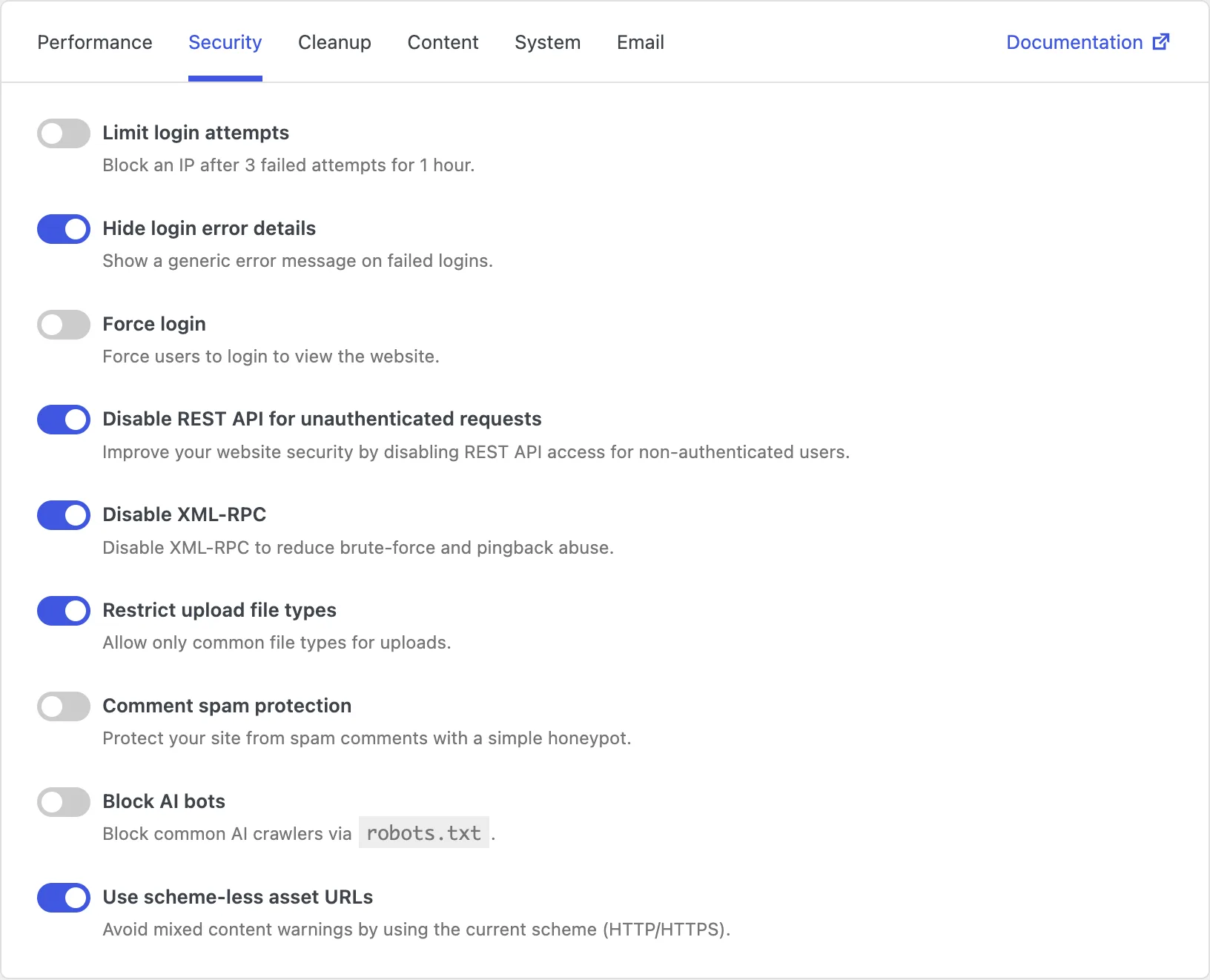
Limit login attempts
The WordPress login page is one of the most attacked parts of any site. Bots try thousands of username and password combinations, hoping one will work. Even if they fail, those attempts waste server resources and can slow things down.
This option blocks an IP address after a few failed logins (3 failed attempts, for 1 hour). That makes brute-force guessing much less effective, because the attacker cannot keep trying forever from the same place.
Keep in mind that a real person who mistypes a password several times can also get locked out temporarily. If that happens, waiting for the lockout to end - or logging in from another network - usually solves it. For most public sites, this is still one of the most useful protections to enable.
Hide login error details
When a login fails, WordPress sometimes tells you whether the username was wrong or only the password was wrong. That is helpful for you - but it is also helpful for attackers. They can use those messages to discover which usernames actually exist on your site, then focus their password guessing on those accounts.
Turning this on shows a generic error message instead. Failed logins still fail, but the site no longer hints at which part was incorrect. This is a small change with a clear benefit, and it rarely affects normal day-to-day use.
Force login
Some sites should not be public at all - staging copies, client previews, company intranets, or private projects. By default, WordPress still shows the front of the site to anyone who knows the address.
Force login requires visitors to sign in before they can view the website. Until they log in, the content stays private. This is a simple way to keep unfinished or internal sites away from casual visitors and search engines.
Just remember that anonymous visitors and search engines cannot access the site. Do not enable this on a normal public website. Use it when privacy matters more than open access.
Disable REST API for unauthenticated requests
The REST API is a modern way for apps, blocks, and plugins to talk to WordPress. On many sites it is useful - but when it is open to anyone, bots can also probe it for user lists and other information.
This option blocks REST API access for visitors who are not logged in. People and tools that are signed in can still use it. That reduces what strangers can discover while keeping admin and authenticated features working. To hide the REST API discovery link from the page header without disabling the API, see Cleanup → Header.
One thing to watch: some front-end features, headless setups, or plugins that rely on public REST API calls may stop working for logged-out visitors. If something breaks after you enable this, turn it back off or adjust that feature. Many brochure and blog sites do not need a public REST API at all.
Disable XML-RPC
XML-RPC is an older remote interface that once helped desktop apps and other services connect to WordPress. Today it is less commonly needed, and it is frequently targeted by bots for login attacks and pingback abuse.
Disabling it closes that older doorway so attackers cannot use it against your site. For most modern sites that publish through the WordPress admin or the block editor, this is a safe and useful hardening step.
Worth noting: older apps or integrations that still depend on XML-RPC will stop working. If you use a classic mobile app or an old publishing tool that needs XML-RPC, leave this off. Otherwise, enabling it is usually a good idea.
Restrict upload file types
WordPress lets users upload many kinds of files to the Media Library. That flexibility is convenient, but it also increases risk: the wrong file type can be dangerous if someone with upload access makes a mistake or an account is compromised.
This option limits uploads to common, everyday file types - the kinds of files most sites actually need, such as images and documents. Anything unusual is blocked. That reduces the chance of risky files ending up on your server.
Be aware that some legitimate file types may be blocked if your workflow needs them. Enable this when your team mostly uploads standard media. If you regularly need uncommon formats, leave it off or adjust your process first.
Comment spam protection
If your site allows comments, spam bots will eventually find the form. They submit junk links and nonsense text, which wastes your time and can make the site look untrustworthy.
This option adds a simple honeypot - a hidden trap that real people do not fill in, but many bots do. When the trap is triggered, the spam comment is blocked. You get fewer junk comments without making the comment form harder for genuine visitors. If you would rather turn comments off entirely, see Content → Comments.
It will not catch every spam message forever, but it is a lightweight first layer that helps a lot of sites with little downside.
Block AI bots
Some automated crawlers visit websites to collect content for AI training or similar uses. That can increase server load and use your content in ways you did not choose.
Turning this on tells common AI crawlers, through robots.txt, that they should stay away. The goal is to reduce unwanted scraping and extra traffic from those bots.
It is not perfect, though. Well-behaved bots that respect robots.txt will stop; others may ignore the request. Still, for many site owners it is a clear, low-effort way to state that AI crawlers are not welcome.
Use scheme-less asset URLs
Your pages load style and script files from addresses that usually start with http:// or https://. Problems appear when a secure page (HTTPS) tries to load a file over the insecure address (HTTP). Browsers then show mixed content warnings, and some files may be blocked.
This option rewrites those asset addresses to a scheme-less form (starting with //). The browser then uses whatever scheme the page itself is using. If the page is HTTPS, the files load over HTTPS too - which helps avoid mixed content warnings.
This is most useful when your site still has mixed HTTP and HTTPS references, or when content was created over time with inconsistent links. On a fully HTTPS site with clean asset URLs, you may not notice a big difference - but when mixed content shows up, this is a practical fix.